GA4Real store sales next to GA4 data
GA4 doesn’t seeall your orders
The store sees every order. DataOrganizer counts sales from orders, not from tracking, so the gap with GA4 stops blocking analysis, and a marketer without access to the store admin finally sees real sales.
No credit cardConnect it yourself, no implementationData refreshed daily
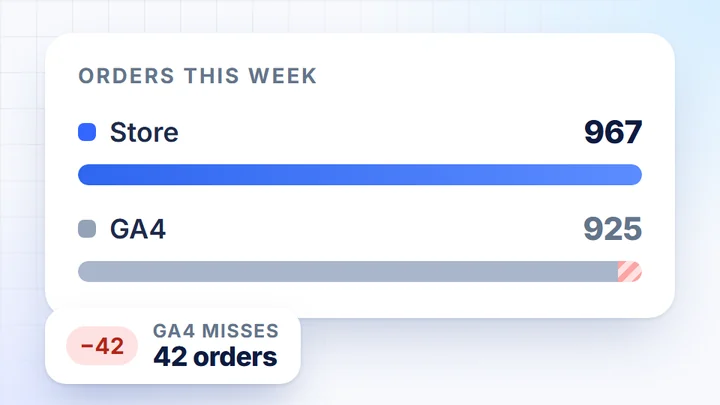
- GATransactions in Google Analytics 4925
This is how it looks in the app
Store ordersnext to GA4 traffic
A sample store, week of 21-27 September 2026, the same “Online store” channel. Switch the card: sales calculated from orders, or traffic and the funnel from Google Analytics 4.
Orders
OverviewDetails+7.8%was €56,900.00
+6.0%was 912
+1.7%was €62.39
+0.2%was 1.14
−2.1%was 11.87%
Most orders on Wednesday (160), fewest on Saturday (118).
Saturday, 26 Sep118 orders−15% vs daily average
78.4% of orders are up to €100. Average €63.42.
- up to €10078.4%758 orders
- 101-€20019.1%185 orders
- 201-€5002.3%22 orders
- over €5000.2%2 orders
Net order value, excluding shipping and tax. The “over €500” row contains orders up to €1,000; there were no more expensive ones in this period.
Yes, a discounted basket is €7.63 higher (+12.7%).
With discountavg. discount 11.62%
Average basket€67.80- Orders
- 412 · 42.6%
- Revenue
- €27,934
Without discount
Average basket€60.17- Orders
- 555 · 57.4%
- Revenue
- €33,396
45.5% of revenue with a discount54.5% without
967 of 1,008 (95.9%). Skipped: 41.
| Status | Share | Orders |
|---|---|---|
| Completed | 72.5% | 731 |
| Processing | 23.4% | 236 |
| Cancelledoutside analytics | 2.4% | 24 |
| Failedoutside analytics | 1.2% | 12 |
| Awaiting paymentoutside analytics | 0.5% | 5 |
Website Traffic
OverviewDetails+4.6%was 65,411
+6.1%was 37,578
+0.82 ppwas 57.45%
+0.07 ppwas 1.28%
+5.9%was €0.82
23 Sep brought 16.6% of the period’s sessions at a 1.43% conversion rate (1.34% on average in the rest of the period).
Most people drop off between viewing a product and adding it to the cart: 7.4% move on. 1.35% of sessions reach a purchase.
↓ 76.3% move on · 16,240 drop off
↓ 7.4% move on · 48,320 drop off
↓ 67.1% move on · 1,270 drop off
↓ 35.7% move on · 1,665 drop off
“linen dress” has 18,420 impressions in position 9, but only 96 clicks.
data still coming in
data still coming in
−0.12 ppwas 2.33%
no changewas 12
Friday, 25 Sep35,990 impr.737 clicks · CTR 2.05%
Google delivers data with a 2-3 day delay
| Query | Clicks · share | Impressions | CTR | Position |
|---|---|---|---|---|
| yourstore brand | 1,10226.7% | 3,870 | 28.48% | 1 |
| yourstore dress brand | 2145.2% | 1,190 | 17.98% | 1 |
| linen dress | 962.3% | 18,420 | 0.52% | 9 |
| shirt | 882.1% | 6,240 | 1.41% | 6 |
| midi dress | 711.7% | 12,860 | 0.55% | 11 |
| blouse | 541.3% | 2,310 | 2.34% | 4 |
| blazer | 411.0% | 3,980 | 1.03% | 8 |
| jacket | 370.9% | 5,210 | 0.71% | 12 |
| Total · whole periodVisible rows: 41.3% | 4,126 | 186,450 | 2.21% | 12 |
GA4: 925 transactions. Store: 967 orders in analytics.
- Sales from ordersNet revenue, number of orders and basket calculated from store orders, excluding VAT and shipping.
- Orders in analyticsCompleted and processing orders count towards the result. Cancelled, failed and unpaid ones are outside analytics.
- Traffic from GA4On the Website Traffic card: sessions, engagement, conversion and transactions from Google Analytics 4.
- Purchase funnelFrom session to transaction in GA4, with the step where most people drop off.
How it works
Three steps. Only the first one needs you.
- 1Once, at the start
You connect your sources
You connect the store with an API key, and Google Analytics 4 and the ad platforms by signing in to your account. Access is read-only and you change nothing in the store’s code.
- 2Daily, without you
DataOrganizer syncs the data
Once a day it pulls new orders with their statuses, GA4 traffic and campaign costs, joins them and recalculates the metrics.
- 3Whenever you like
Work wherever you prefer
In ready-made dashboards, with the AI Assistant in the app or in your own AI chat via MCP.
DashboardsAI AssistantMCP
For the implementation person
You fix the tracking.You analyse sales today.
Setting up e-commerce tracking in GA4 and Google Tag Manager, and the purchase events don’t match orders in WooCommerce or PrestaShop? DataOrganizer doesn’t replace fixing the tracking, but it lets you analyse sales before the tracking is right.
Calculated from store orders
Sales without guesswork
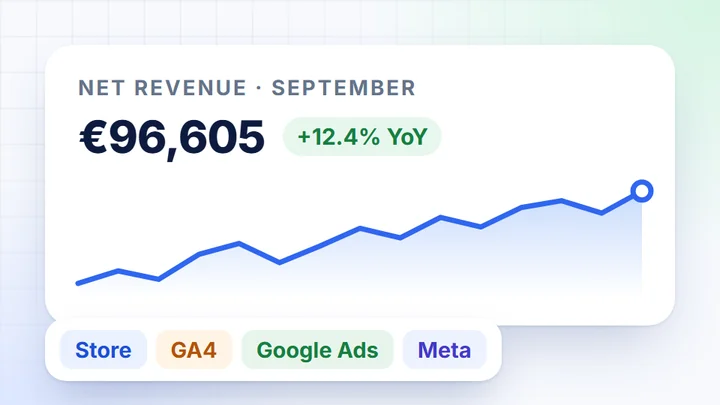
- Net revenue and number of orders from the statuses you choose for the channel.
- Products and customers: what sells, who buys for the first time and who comes back.
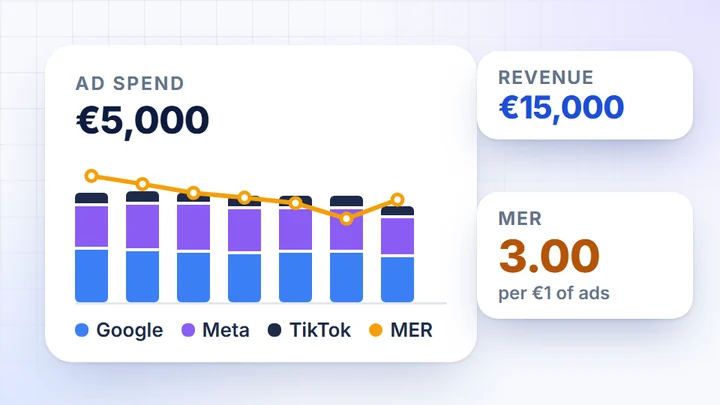
- MER and ad cost per order: ad platform spend next to store sales.
Calculated from Google Analytics 4
As good as your tracking
- Sessions, engagement and conversion on the Website Traffic card.
- Purchase funnel: from session, through the cart, to transaction.
- ROAS, CPA and attribution, because they are calculated from GA4 transactions and revenue.
Why does GA4 revenue differ from store orders?
GA4 adds up gross order value, including delivery cost, and doesn’t check order statuses, so it also counts orders the store later cancels.
DataOrganizer calculates net revenue, excluding VAT and shipping, only from orders with the statuses chosen for the channel. So the amounts from the two sources can’t simply be subtracted.
Quick data diagnostics
Source consistency and funnel completeness in 60 seconds.
Ads vs Analytics discrepancy
Where the conversion difference exceeds 50%, a sign of a tracking problem.
Data Availability
Which sources are connected, for what period and when the last sync happened.
For the marketer
Orders without the store admin.An invitation is enough.
Only have access to Google Analytics 4 and can’t see store orders? The account admin invites you as a User with data view. You see real sales, and the store admin stays closed.
- 1
The admin adds you by email
The account owner or admin adds you in the DataOrganizer panel using your email address.
- 2
You get the User role
Data view: you filter, export and ask the AI Assistant. No effect on the configuration and no access to the store admin.
- 3
You see sales next to GA4 and campaigns
Store orders, GA4 traffic and ad costs in one app, refreshed daily.
Roles in a DataOrganizer account
AdminFull access
- All dashboards
- Managing integrations
- Inviting users
- Export and import
- Subscription and billing
UserData view
- Selected dashboards
- Filters and views
- CSV export
- AI Assistant
- Integrations
- Inviting
The number of users in an account is unlimited.
Integrations
Connect your store, GA4 and ad platforms
Store platforms
- WoWooCommerce
- PsPrestaShop
- MgMagento 2
- IdIdoSell
- ShShoper
- SkSky-Shop
- RcRedCart
Analytics, ads and affiliate
- GAGoogle Analytics 4
- AdGoogle Ads
- MeMeta Ads
- TtTikTok Ads
- CrCriteo
- TTTradeTracker
- MCMerchant Center
- SCSearch Console
Can’t see your platform? Write to contact@dataorganizer.io.
See real salesnext to GA4 data
Connect your store and Google Analytics 4. For 14 days you get everything free, with no credit card.
14 daysfree,
no credit card
- Every feature: cards, AI Assistant, MCP and exports
- Any number of users, including a marketer without store admin access
- Data refreshed once a day, no exports