PMaxBestsellers and zombie products from store and GA4 data

Product lists for PMaxand custom_labelwithout Excel

A product list for a campaign is built from data no single platform has together. On the Products card you filter by combined metrics from the store and GA4: sales, traffic, conversion and stock, and download the finished list in one go.

No credit cardConnect it yourself, no implementationData refreshed daily

Zombie list for PMax, todayapprox. 40 min every time
  1. CSVProduct and order export from the store15 min
  2. GA4Product report from Google Analytics 410 min
  3. fxVLOOKUP by product ID15 min
Total, for every new list40 min
In DataOrganizer: the “No sales” filter and export178 products with no sales in a CSV file, with store and GA4 data in one table.

This is how it looks in the app

Filter, result, exporton the Products card

A sample store, week of 21-27 September 2026, all channels. In the Details tab of the Products card, store sales and GA4 data are in one table. Tick a ready-made filter and download the result as CSV or Excel, or load it into a sheet with the Google Sheets add-on. You get a list ready for a campaign or a feed.

Revenue for the whole store rose by 8.0%, while the 187 products in the “Revenue down” filter lost 22% of their revenue between them.

  1. Dataset and columns55 columns grouped by source: store, Google Analytics 4 and combined data.
  2. Ready-made filters“Revenue down”, “No sales”, “In cart, not bought”, “Out of stock” and others. They work instantly, with no conditions to write.
  3. Result with a totalThe “Total” row adds up only what is left in the table: 187 products and €29,940.
  4. ExportCSV and Excel contain every row of the list, while copying to the clipboard takes only the visible page.

Ready-made list recipes

Six campaign listsfrom the same data

Every recipe has the same layout: filter, result, export. Filter, column and card names are the same as in the app, and the numbers come from a sample store.

1Performance Max

Bestsellers and products with no sales for PMax

Find bestsellers by sorting on the “Net revenue” column and with the ready-made “Revenue ≥ €1,000” filter. Catch zombie products with the “No sales” filter and, thanks to GA4 data, also with “In cart, not bought”.

  1. Filter, each separately
    Revenue ≥ €1,000No sales
  2. Result
    Total · 21€39,108.00Total · 178€0.00
  3. Export
    CSVRows: 21 · columns: 5CSVRows: 178 · columns: 5

2custom_label

Product segments for custom_label in Merchant Center

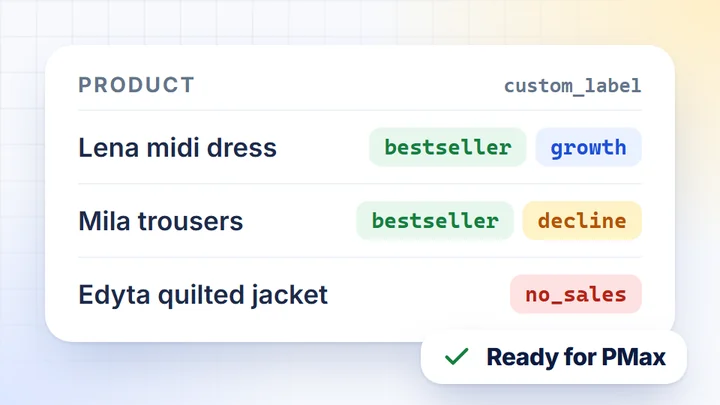
The ready-made filters give you segments: “Revenue ≥ €1,000” is bestsellers, “Revenue up” and “Revenue down” are the trend, and “No sales” is products with no sales. DataOrganizer gives you the segments, and a Google Sheets template creates the custom_label values.

  1. Filter, each separately
    Revenue ≥ €1,000Revenue upRevenue downNo sales
  2. Result

    idtitlecustom_label_0custom_label_1

    10231Lena midi dressbestsellergrowth

    10244Wera dressbestsellergrowth

    10158Mila trousersbestsellerdecline

    10052Edyta quilted jacketno_sales

  3. Export
    Google Sheets add-onExtensions → DataOrganizer

3Clearance

Clearance products: no sales, but in stock

A list of products with no sales for 90 days. A second filter, “Out of stock”, shows the ones no longer in the warehouse (9 of 74 in the example, so 65 remain in stock), and you can check the stock of the rest in the “Stock” column on the Products card Overview.

  1. Filter
    Last 90 daysNo sales
  2. Result
    Total · 74€0.00+ Out of stock · 9€0.00
  3. Export
    CSVRows: 74 · columns: 5

4Stock levels

Bestsellers running out of stock

The “Stock” signal on the Products card Overview points to a bestseller that is running low. The “Stock” column gives the units and, when stock is short, warns how many days it will last. The “Out of stock” filter collects what is already missing.

  1. Filter
    Revenue ≥ €1,000
  2. Result

    Stock

    Lena midi dress – stock for approx. 3 days7 units in stock at a pace of 16 units/week

    Wera dress8 units · ~5 days

    Ada summer dress11 units · ~6 days

  3. Export
    CSVRows: 21 · columns: 5

5Remarketing

Products added to the cart but not bought

The ready-made “In cart, not bought” filter combines GA4 events with store orders. You get the products customers put in the cart and leave behind: a list for a remarketing campaign or a dynamic catalogue in Meta Ads.

  1. Filter
    Last 90 daysIn cart, not bought
  2. Result
    Total · 37€0.00
  3. Export
    CSVRows: 37 · columns: 5

6Season

Seasonal products, e.g. Black Friday, based on last year’s sales and stock

Choose last year’s Black Week as the period, tick the “Revenue ≥ €1,000” filter, and the “Stock” column shows today’s stock. You see which hits from that week need restocking before Black Friday on 27 November.

  1. Filter
    24-30 Nov 2025vs 24-30 Nov 2024Revenue ≥ €1,000
  2. Result
    Total · 46€132,550.00+ Out of stock · 3€7,640.00
  3. Export
    CSVRows: 46 · columns: 5

DataOrganizer only reads data: you upload the finished list to Merchant Center, Google Ads or Meta yourself. Filters are combined with “and”, and stock levels come from the nightly sync and depend on what your store platform provides.

Prices and feed from Merchant Center

Prices against the market,before a product goes into a campaign

DataOrganizer joins Merchant Center data with store products by ID when the feed uses the same IDs as the store. In the same app you see which products are more expensive than the market median and which ones Merchant Center has rejected. A sample store, as of the end of September 2026.

5 of the 9 visible products on the “Revenue down” list are more than 40% above the median, and the Nela skirt (revenue −39%) is rejected in the feed for “Price mismatch with the page”.

  1. Prices against the marketYour price next to the Google median, split into cheaper and more expensive.
  2. Over 5% more expensive64 of 344 products with a market price, largest difference first.
  3. Merchant Center feedHow many products are approved, rejected and under review.
  4. Why rejectedReasons with the number of products and a list to fix, with product IDs.

How it works

Three steps. Only the first one needs you.

  1. 1Once, at the start

    You connect your sources

    You connect the store with an API key, and Google Analytics 4, Google Ads and Merchant Center by signing in to your account. Access is read-only.

  2. 2Daily, without you

    DataOrganizer syncs the data

    Once a day it pulls product sales, stock, GA4 traffic and Merchant Center data, joins them by product ID and recalculates the metrics.

  3. 3Whenever you like

    Work wherever you prefer

    In ready-made dashboards and the Details tab of the Products card, with the AI Assistant in the app or in your own AI chat via MCP.

    DashboardsAI AssistantMCP

Who it’s for

Everyone builds a different list from the same data

PPC specialist

Bestsellers and zombies without VLOOKUP

Today: you export products from the store and a report from GA4, join them by ID and split them by hand into bestsellers and products that don’t sell.

  • Lists for Performance Max. “Revenue ≥ €1,000”, “No sales” and “In cart, not bought”.
  • Segments for custom_label. Save any filter as a view and come back to it with one click.
  • A ready-made AI task. “Dead products – what wastes traffic”: lots of views, zero sales.
  • Export. CSV, Excel or the Google Sheets add-on.
E-commerce manager

Clearance, stock and prices in one place

Today: you check stock in the store admin, sales in a report, and prices and rejected products in Merchant Center.

  • Products that don’t move. “No sales” in any period and “Out of stock”.
  • Bestseller stock. The “Stock” signal and the “Stock” column with a warning when stock runs short.
  • Prices against the market. Your price next to the Merchant Center median, for the same product IDs.
  • Feed health. How many products Merchant Center rejected and why.

Integrations

Connect your store, GA4 and Merchant Center

Store platforms

  • WoWooCommerce
  • PsPrestaShop
  • MgMagento 2
  • IdIdoSell
  • ShShoper
  • SkSky-Shop
  • RcRedCart

Analytics, ads and affiliate

  • GAGoogle Analytics 4
  • AdGoogle Ads
  • MeMeta Ads
  • TtTikTok Ads
  • CrCriteo
  • TTTradeTracker

Google

  • MCMerchant Center
  • SCSearch Console

Can’t see your platform? Write to contact@dataorganizer.io.

Build your firstcampaign list

Connect your store, GA4 and Merchant Center. For 14 days you get everything free, including exports and the Google Sheets add-on, with no credit card.

14 daysfree,
no credit card

  • Every feature: cards, AI Assistant, MCP and exports
  • 55 columns from the store, GA4 and combined data
  • Data refreshed once a day, no exports