LTVCustomer value and repeat purchases calculated from orders

LTV and repeat customerswithout a spreadsheet

Customer value and repeat purchases are calculated from orders, with no manual LTV calculation from an export. You know what a customer is worth and whether they come back before you plan a campaign for returning customers.

No credit cardConnect it yourself, no implementationData refreshed daily

LTV from an export, todayapprox. 75 min every month
  1. CSVOrder export from the store10 min
  2. fxPivot table: orders by customer20 min
  3. 1+Who bought for the first time and who came back20 min
  4. €LTV and average basket in Excel15 min
  5. ?What returning customers buy10 min
Total, from scratch every month75 min
In DataOrganizer the Customers card is ready every dayNew and returning customers, time between purchases and LTV, calculated from orders.

This is how it looks in the app

How many customers come backand what they’re worth

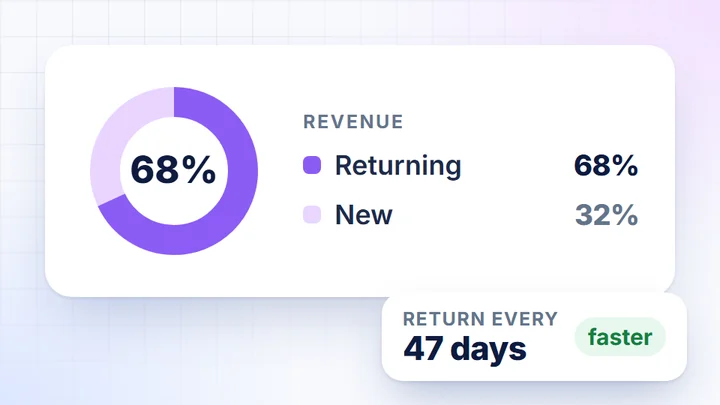
A sample store, week of 21-27 September 2026. From orders, the Customers card calculates new and returning customers, time between purchases and customer value since the first purchase.

Returning customers are 754 of the week’s 1,156 buyers and 68.0% of store revenue.

  1. New and returningShare of revenue, number of customers and average basket for each group.
  2. How often they come backGroups by time between purchases: who comes back every month and who less often than every quarter.
  3. Customer value (LTV)How many customers have spent up to €100, up to €500 or more in total since their first purchase.
  4. What new and returning customers buyRevenue for each product split between both groups.

How to use it in a campaign

What new customers buy,and what returning ones buy

Products customers start with suit campaigns aimed at new customers. The ones they come back for suit campaigns for returning customers. You have both lists on the Customers card, without joining exports.

Campaign for new customers

First-purchase products

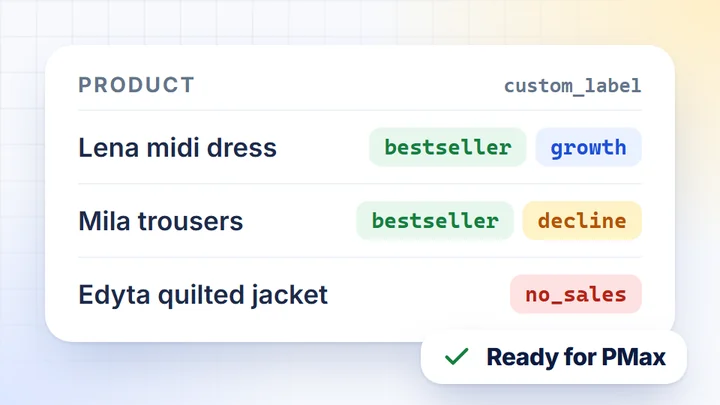
  • The Lena midi dress is 10.8% of revenue from new customers, and 61% of its sales come from new customers.
  • The ready-made AI task “Products for an acquisition campaign”: the products most often bought as a first order.
  • New customers spend €58.56 per order on average, so you know the basket they start with.

Campaign for returning customers

Products people come back for

  • The Iga blazer is 83% bought by returning customers, and the Oskar shirt 70%.
  • The ready-made AI task “Products for a retention campaign”: products bought with the second and third order.
  • Returning customers spend €66.45 on average, €7.89 more than new ones.

Groups and products, not lists of people

DataOrganizer doesn’t send customer lists to email tools. It shows customer groups and the products they buy, and you set up the audience in your ad platform or your own tool.

The Customers card shows aggregate figures, without customers’ names, addresses, emails or phone numbers. LTV and repeat purchases are calculated from store orders.

How it works

Three steps. Only the first one needs you.

  1. 1Once, at the start

    You connect your sources

    You connect the store with an API key, and Google Analytics 4 and the ad platforms by signing in to your account. Access is read-only and you change nothing in the store’s code.

  2. 2Daily, without you

    DataOrganizer syncs the data

    Once a day it pulls new orders, recognises new and returning customers and recalculates customer value and the time between purchases.

  3. 3Whenever you like

    Work wherever you prefer

    In ready-made dashboards, with the AI Assistant in the app or in your own AI chat via MCP.

    DashboardsAI AssistantMCP

Who it’s for

LTV and repeat purchases without exporting to Excel

CRM person

LTV and repeat purchases without a spreadsheet

Today: you export orders, group them by customer in a spreadsheet and work out LTV and the share of returning customers by hand.

  • New and returning. Number of customers, share of revenue and average basket for each group.
  • How often they come back. Frequent, regular and occasional purchases by the time between them.
  • Customer value since first purchase. How many customers are in each LTV bracket.
  • Data for the report. Download tables from Details as CSV or Excel.
Store owner

Average basket and returning customers, instantly

Today: you export orders from your store, for example from WooCommerce, and work out the average basket and the number of returning customers in Excel.

  • Average basket. For all customers and separately for new and returning ones.
  • Customers with 3+ orders. How many there are and what share of buyers they make up.
  • Time between orders. Whether customers come back sooner or less often than a week earlier.
  • Questions for the AI Assistant. For example, what new and returning customers buy.

Integrations

Connect your store and ad platforms

Store platforms

  • WoWooCommerce
  • PsPrestaShop
  • MgMagento 2
  • IdIdoSell
  • ShShoper
  • SkSky-Shop
  • RcRedCart

Analytics, ads and affiliate

  • GAGoogle Analytics 4
  • AdGoogle Ads
  • MeMeta Ads
  • TtTikTok Ads
  • CrCriteo
  • TTTradeTracker

Google

  • MCMerchant Center
  • SCSearch Console

Can’t see your platform? Write to contact@dataorganizer.io.

See how many customers come backand what they’re worth

Connect your store and check the Customers card on your own orders. For 14 days you get everything free, with no credit card.

14 daysfree,
no credit card

  • Every feature: cards, AI Assistant, MCP and exports
  • New and returning customers, with the products they buy
  • Data refreshed once a day, no exports