WixA Wix API key instead of order exports

Wixwithout CSV exports

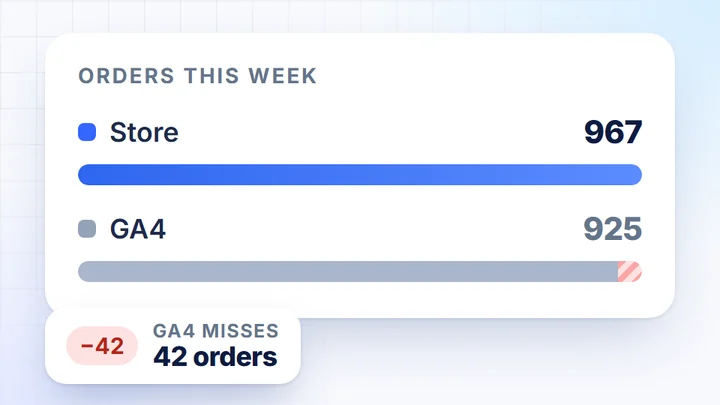
Instead of exporting orders from your Wix store and joining them with GA4 in a spreadsheet: generate an API key in your Wix account settings and paste it into DataOrganizer together with your Account ID. Orders, products and customers are ready for analysis and refreshed daily.

No credit cardNo app and no changes to your siteData refreshed daily

Today: exporting orders from Wixevery week

orders_wix.csv

# order export, 1,402 rows
number;date;payment;fulfillment;total
10871;2026-09-27;paid;fulfilled;219.00
10870;2026-09-27;unpaid;unfulfilled;64.90
10869;2026-09-26;refunded;fulfilled;342.50
…

Then, still by hand

  • unpaid and refunded: filtered by hand
  • net without tax and shipping: formulas
  • GA4, Google Ads and Meta: more exports
In DataOrganizer: paste the API key onceOrders, products and stock are ready every day, next to GA4 and campaigns.

This is how it looks in the app

Wix connected,next to Google and Meta

A sample store, as of 28 September 2026. The “Data Availability” panel shows every source: the date range and the time of the last sync. Wix sits next to Google Analytics, Search Console, Merchant Center, Google Ads and Meta Ads.

  1. Wix in your data sourcesOrders and product data, with the date range and the time of the last sync.
  2. Google and Meta next to the storeAnalytics, Search Console, Merchant Center, Google Ads and Meta Ads in the same view.
  3. History rangeYou choose how much history to pull. The “Integrations” button takes you to the data sources.

How it works

Three steps. Only the first one needs you.

  1. 1Once, at the start

    You connect Wix

    Paste the API key and Account ID into the source wizard. No changes to your Wix site.

  2. 2Daily, without you

    DataOrganizer syncs the data

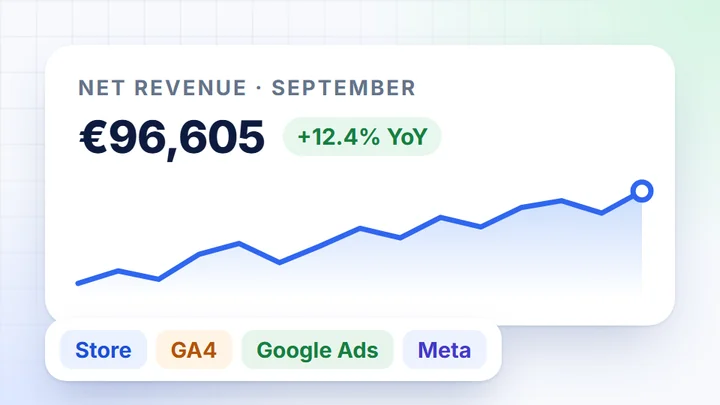
    Once a day it pulls orders, products and stock, calculates net revenue and joins the store with GA4 and campaigns.

  3. 3Whenever you like

    Get the data out however you like

    Ready-made cards, table export, the Google Sheets add-on or MCP for Claude and other AI assistants.

    CSVExcelGoogle SheetsMCP

How to connect Wix

A Wix API key.No app and no changes to your site.

The connection uses the platform’s official API. DataOrganizer only reads data and changes nothing in your store.

In your Wix accountWix account owner

  1. Open the account’s API keys.In your Wix account settings, not in the site editor.
    Account Settings → API Keys
  2. Generate an API key.Click Generate API Key and tick the Wix Stores, Wix Ecommerce and Business Info permissions.
  3. Copy the key and Account ID.Copy the Account ID on the same page, with the Copy ID button in the Account ID box.

To copy

API KeyIST.eyJ••••••••••••

Account ID5c1e••••-••••-8a2f

In DataOrganizerdata source wizard

  1. Add a source.Choose the sales channel, then the Wix platform.
    Data integrations → Data sources → Add source
  2. Paste the access details.API KeyAccount ID
  3. Tick the statuses counted as revenue.In the channel’s “⋯” menu. Other orders are “outside analytics”.

PermissionsWix Stores, Wix Ecommerce and Business Info permissions; DataOrganizer only reads data

First syncto start, we pull data from the last 90 days

After thatonce a day; you can also run a sync manually

What goes into DataOrganizer

Orders from your Wix storeready for analysis

One tidy table instead of order exports from your Wix store stitched together with GA4 in a spreadsheet. Calculated the same way every day.

AreaWhat we pullHow we calculate

Ordersnumber, date, status and valueyou choose which statuses count as revenue

Revenuenet, excluding VAT and shipping costsVAT rates pulled from the platform

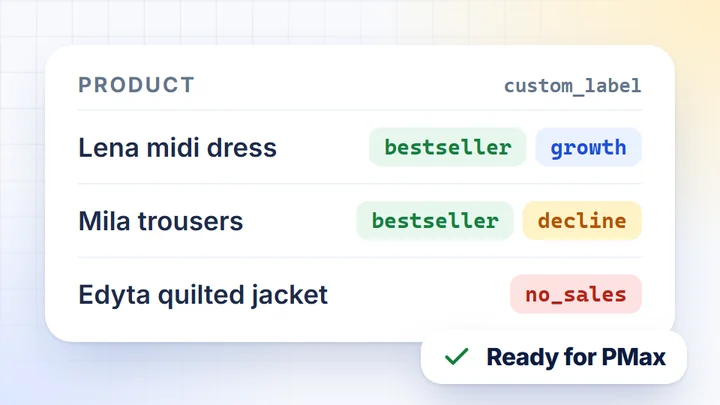
ProductsID, name, price, category and variantsthe “Products” and “Current prices” datasets

Stock levelsproduct stockevery night at approx. 2:00, if the platform provides stock

Payments and deliverypayment and delivery methodsshare of orders for each method

Discountscoupon codes and promotionsdiscount next to basket value

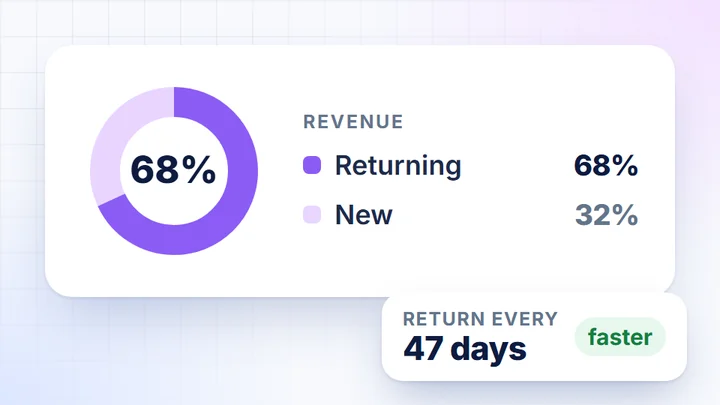
Customersnew and returning, purchase frequency, LTVonly aggregate figures in views and exports, without names, addresses, emails or phone numbers

In the app · Orders card

Orders in analytics

1,356 of 1,402 (96.7%). Skipped: 46.

StatusShareOrders

Completed74.8%1,048

Processing22.0%308

Cancelledoutside analytics2.1%29

Failedoutside analytics0.9%12

Awaiting paymentoutside analytics0.4%5

You choose the counted statuses in the channel’s “⋯” menu in Integrations. The rest doesn’t count as revenue.

History and refreshYou choose how much history to pull and can change it with the “Update data range” button. Data refreshes once a day, or manually when needed.

How you get the data out

CSV, Excel, Google Sheetsor MCP for your AI assistant

Data from Wix and your other sources sits in tables on the cards. Export a table with one click, or connect a Google Sheet and an AI assistant that pulls the data itself.

  1. DatasetsProducts, Current prices, Daily Data and more. You pick the columns from the store, GA4 and combined data.
  2. ExportCSV and Excel contain every row, while copying to the clipboard takes only the visible page.
  3. MCPPaste the server address into Claude, ChatGPT, Gemini or Perplexity and sign in with your DataOrganizer account.
  4. Google Sheets add-onIn the sheet: Extensions → DataOrganizer. Data refreshes on the schedule you choose.

Who it’s for

Wix connected once, data for the whole team

Wix store owner

Wix sales next to GA4 and campaigns

Today: you export orders from your Wix store to a spreadsheet and copy GA4, Google Ads and Meta data over from separate panels.

  • One view. Sales, traffic and campaigns on the Summary card.
  • Revenue calculated. Net, excluding VAT and shipping, from the statuses you choose.
  • AI Assistant. Ask about your data in plain language, in the app.
  • Fresh data every day. No manual export.
Agency or freelancer

Reports for Wix stores

Today: you collect exports from several Wix stores and build a report from them in a spreadsheet every month.

  • An API key from your account settings. Paste it once, together with the Account ID.
  • Several stores or countries. Each store in a separate sales channel.
  • Ready-made cards. Sales, products, customers and campaigns without building a dashboard.
  • CSV, Excel, Sheets, MCP. Data in the format your client needs.

Integrations

Connectors you don’t have to write

Store platforms

  • WooCommerce
  • PrestaShop
  • Magento 2
  • Shopify
  • Wix
  • Shopware

Analytics, ads and affiliate

  • Google Analytics 4
  • Google Ads
  • Meta Ads
  • TikTok Ads
  • Criteo
  • TradeTracker

Google

  • Merchant Center
  • Search Console

Can’t see your platform? Write to contact@dataorganizer.io and we’ll check its API.

Connect Wix once.Get your data every day.

Paste the API key once and DataOrganizer does the rest. For 14 days you get everything free, with no credit card.

14 daysfree,
no credit card

  • Every feature: cards, AI Assistant, MCP and exports
  • Wix next to GA4, Google Ads and Meta Ads
  • Data refreshed once a day, no exports